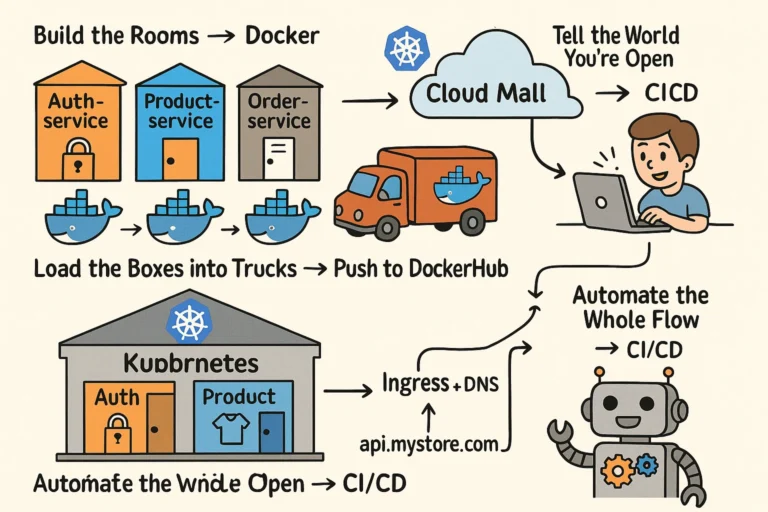
or Any App
Imagine you’re building an online mega-store 🏬, and each department (like “login”, “products”, “orders”) is a separate room (microservice). You want to open this store in the cloud mall (e.g., Google Cloud, AWS, etc.).
🪜 Step-by-Step: The Journey of Your App to the Cloud
1️⃣: Build the Rooms → Docker
Each microservice (like auth, product, order) is like a separate room in your store.
You pack each room into a container box using a Dockerfile.
[ auth-service ] ---> 🐳 Dockerfile ---> 📦 auth-service:latest
[ product-service ] ---> 🐳 Dockerfile ---> 📦 product-service:latest
Now you have “shippable boxes” (Docker containers) of your services.
2️⃣: Load the Boxes into Trucks → Push to DockerHub
You send your boxes (containers) to a storage warehouse (like DockerHub or GitHub Container Registry).
📦 auth-service:latest → 🚛 → 🗃️ DockerHub
📦 product-service:latest → 🚛 → 🗃️ DockerHub
Think of DockerHub as an online warehouse for your app’s containers.
3️⃣: Build the Store in the Cloud → Kubernetes
Now that your containers are ready, you need to arrange them inside your store building. You use Kubernetes like your store blueprint builder (Kube = Architect).
- Each
deployment.yaml= Blueprint for a room - Each
service.yaml= Door to enter that room ingress.yaml= Main entrance (routes to right rooms)
Kubernetes:
   ┌───────────────────────────────┐
   │         Cloud Mall            │
   │   ┌────────┐   ┌────────┐     │
   │   │ Auth   │   │ Product│     │
   │   └────────┘   └────────┘     │
   │      ▲           ▲           │
   │   Service      Service       │
   │      ▲           ▲           │
   │    Ingress → api.mystore.com │
   └───────────────────────────────┘
Kubernetes runs your containers and connects them properly inside the cloud.
4️⃣: Tell the World You’re Open → Ingress + DNS
You expose your main door using Ingress (like the front gate). Then attach a domain (like api.myecom.com) to it via DNS.
User → 🌐 api.myecom.com → Ingress → Auth / Product / Order services
5️⃣: Automate the Whole Flow → CI/CD
Now, every time you change your app, you want it to auto-deploy.
So you add a robot helper (GitHub Actions):
GitHub Push →
   🔁 Build Docker Image →
   🚀 Push to DockerHub →
   ⚙️ Deploy to Kubernetes
📊 Simple Visual Flow
[ Node.js App ]
      ↓
[ Dockerfile ] → docker build
      ↓
[ Container Image ] → push to DockerHub
      ↓
[ Kubernetes YAMLs (deployment + service + ingress) ]
      ↓
[ Deploy to Kubernetes Cluster (Cloud) ]
      ↓
[ Public Domain → Ingress → Services ]
☁️ Example: Google Cloud (GKE) Deployment Flow
- Create GCP project → Enable GKE
- Create Kubernetes cluster
- Install
kubectl+ authenticate to cluster - Run:
kubectl apply -f auth/k8s/ kubectl apply -f product/k8s/ kubectl apply -f ingress.yaml - Get IP address from ingress
- Point your domain (
api.myecom.com) to that IP
🎁 Want a Real Example?
Comment below , i wil provide this
- Dockerfile for
auth-service - Kubernetes
deployment.yaml,service.yaml - Ingress config for routing
- Sample GitHub Actions CI/CD script