Most developers know how to write code.
Fewer understand what actually happens after they click “Merge Pull Request.”
And even fewer truly understand what Kubernetes is doing when a new version goes live.
This post is not a beginner tutorial.
This is a practical breakdown of how code moves from Git → CI/CD → Helm → Kubernetes → Production — both for:
- A single microservice
- A multi-service architecture
If you’ve ever shipped something that broke production at 2 AM, this is for you.
The Mental Model That Changes Everything
Before we talk about YAML or Helm, you need one mental shift:
Kubernetes does not “deploy code.”
Kubernetes maintains desired state.
You declare:
“I want 3 pods running image v1.4.2.”
Kubernetes constantly checks:
“Are there 3 pods running v1.4.2?”
If not, it fixes it.
Everything — rolling updates, restarts, scaling — is just the cluster reconciling reality with desired state.
Once you understand this, deployments stop feeling magical.
Part 1 — The Single Service (Where Most People Start)
Let’s say we have a simple Node.js API.
It has:
/health/returning version string
We build a Docker image:
demo-api:1.0.0
We deploy this YAML:
apiVersion: apps/v1
kind: Deployment
metadata:
  name: demo-api
spec:
  replicas: 2
  selector:
    matchLabels:
      app: demo-api
  template:
    metadata:
      labels:
        app: demo-api
    spec:
      containers:
        - name: demo-api
          image: myrepo/demo-api:1.0.0
          ports:
            - containerPort: 3000
When applied, Kubernetes creates:
- A Deployment object
- A ReplicaSet
- 2 Pods
Now the interesting part begins.
What Actually Happens When You Update the Image
You push:
demo-api:1.0.1
Then update the Deployment image.
Kubernetes sees that .spec.template changed.
That triggers:
- New ReplicaSet creation
- New pods start
- Readiness probes checked
- Old pods terminated gradually
That’s a rolling update.
No Helm logic.
No CI magic.
Just the Deployment controller doing its job.
Important Rule You Should Never Forget
Only changes inside:
.spec.template
Trigger new ReplicaSet creation.
Examples that trigger rollout:
- Image change
- Env variable change
- Resource limit change
- Container command change
Examples that do NOT trigger rollout:
- Changing replicas
- Changing Service YAML
- Changing labels outside template
This distinction has caused real production confusion in real teams.
War Story #1: “It Was Just a Small Memory Change”
We once reduced memory limit from:
512Mi → 256Mi
Seemed harmless.
Deployment rolled out across 40 pods.
Under load, pods started OOM-killing.
Traffic dropped.
Error rate spiked.
Rollback saved us.
Lesson:
Every .spec.template change is a real deployment.
Treat it like one.
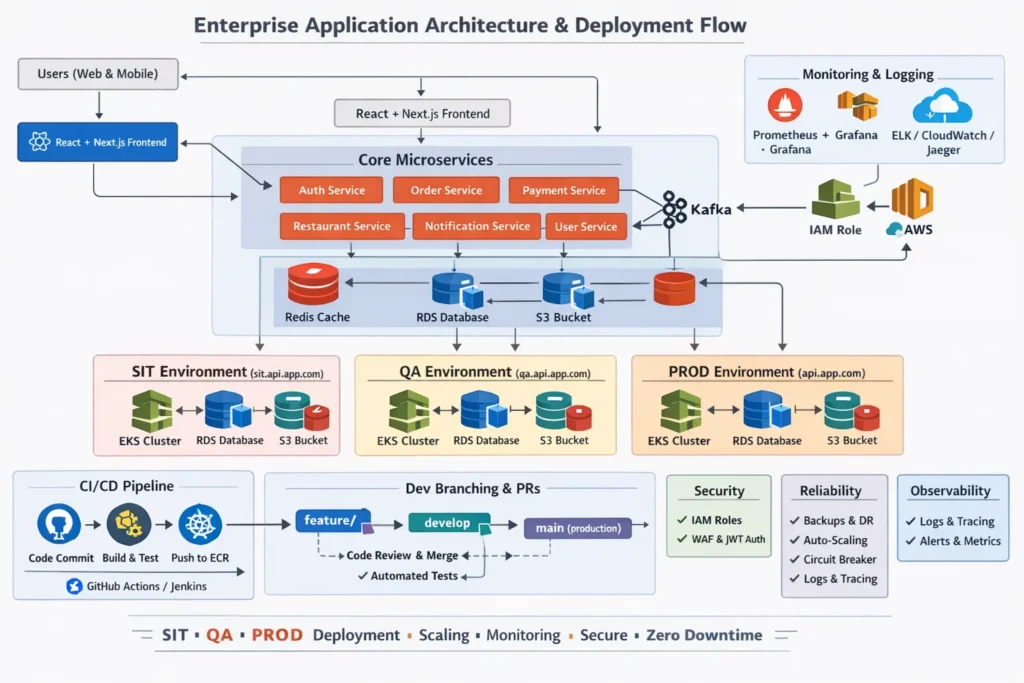
Part 2 — Now Add Multiple Services
Now let’s move to something realistic:
- auth-service
- order-service
- payment-service
- api-gateway
Each has:
- Separate Docker image
- Separate Deployment
- Separate Service
They live in the same cluster.
But they are isolated.
How Services Talk Internally
Inside Kubernetes:
http://auth-service
http://order-service
Kubernetes DNS resolves service names automatically.
No public exposure needed.
Ingress handles external routing.
How Deployment Works in Multi-Service Setup
Each service has its own Helm chart.
Structure might look like:
services/
  auth-service/
  order-service/

helm/
  auth-service/
  order-service/
When you update order-service:
Only that Helm release is upgraded.
Only that Deployment changes.
Only that ReplicaSet rolls.
Other services are untouched.
This isolation is critical in production.
The Real Production Flow (No Manual kubectl)
Developers do not SSH into clusters.
They do not run kubectl manually.
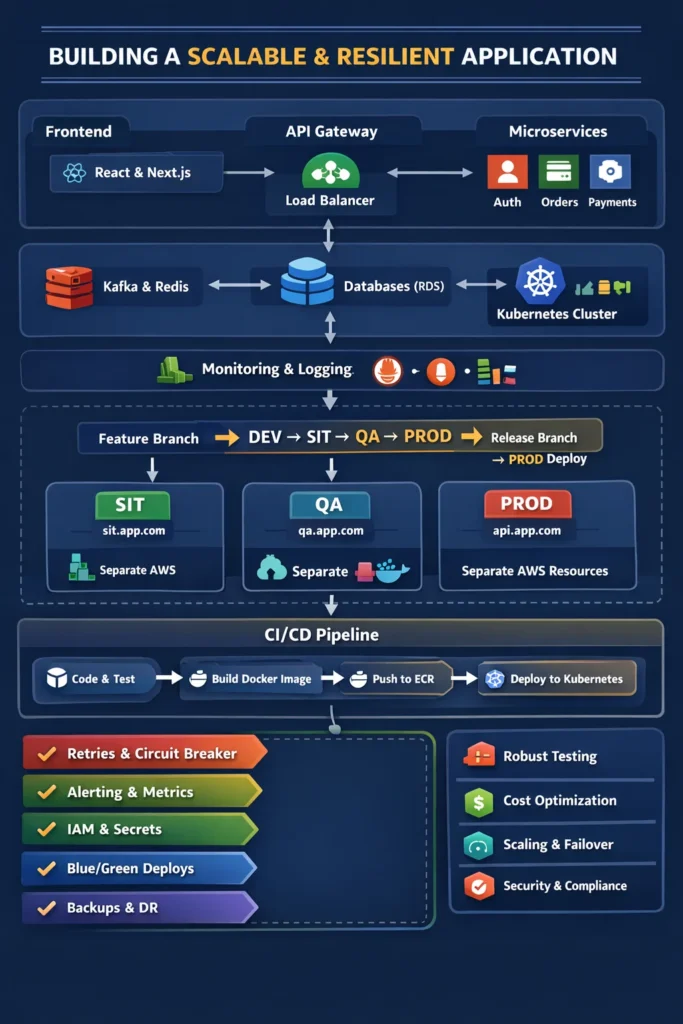
Here’s the real flow:
Step 1 — PR Merged
Code merged into main branch.
Step 2 — CI Pipeline Runs
CI:
- Runs tests
- Builds Docker image
- Tags image with commit SHA
- Pushes image to registry
Example tag:
order-service:1.4.2-a8f3d21
Never use latest.
Never reuse tags.
Immutability prevents chaos.
Step 3 — Deployment Triggered
Two common approaches:
Approach A: CI Runs Helm
Pipeline executes:
helm upgrade order-service --set image.tag=1.4.2-a8f3d21
Approach B: GitOps
Pipeline updates image tag in config repo.
ArgoCD detects change and syncs cluster.
In both cases:
Kubernetes handles rollout.
What Happens Inside Kubernetes During Rollout
Let’s say:
- replicas: 4
- strategy: RollingUpdate
Kubernetes:
- Creates new pod
- Waits for readiness probe
- Deletes old pod
- Repeats
If readiness fails:
Rollout pauses.
If liveness fails:
Pod restarts.
This is why health checks matter.
Security Risks Most Teams Ignore
1. Using latest
You lose traceability.
Rollbacks become unpredictable.
2. Hardcoded secrets in values.yaml
Leaks happen.
Always use Secrets or external secret managers.
3. No readiness probes
Traffic hits pods before they’re ready.
4. No resource limits
One runaway pod can impact the entire node.
5. Giving developers cluster-admin
Production should have strict RBAC.
War Story #2: The ConfigMap Illusion
We updated a ConfigMap expecting new config to apply.
Pods didn’t restart.
Why?
ConfigMap changes do not restart pods automatically.
You must:
- Restart deployment
OR - Add checksum annotation to trigger rollout
That mistake cost us an hour of debugging.
Trade-Offs: Single Service vs Microservices
Single Service
Pros:
- Simpler debugging
- Fewer moving parts
Cons:
- Scaling everything together
- Larger blast radius
Microservices
Pros:
- Independent scaling
- Independent deployment
- Smaller failure domains
Cons:
- Operational overhead
- Distributed tracing complexity
- Version compatibility risks
Microservices are not automatically better.
They’re a trade-off.
How Rollback Actually Works
When you update Deployment:
Old ReplicaSet is not deleted.
It’s scaled to 0.
That’s why you can run:
kubectl rollout undo deployment/order-service
Rollback is just scaling old ReplicaSet back up.
Simple. Powerful. Underused.
Observability Is Not Optional
You need:
- Logs
- Metrics
- Tracing
Otherwise, you are blind during rollout.
If error rate spikes during deployment:
You should know within seconds.
The Engineering Mindset You Need
Don’t think:
“How do I deploy?”
Think:
“What changes in .spec.template?”
That’s the real deployment trigger.
If you understand that, you understand Kubernetes.
Meme Idea
Panel 1:
“Just updating an environment variable.”
Panel 2:
ReplicaSet spinning up 100 new pods.
Caption:
“Kubernetes heard you.”
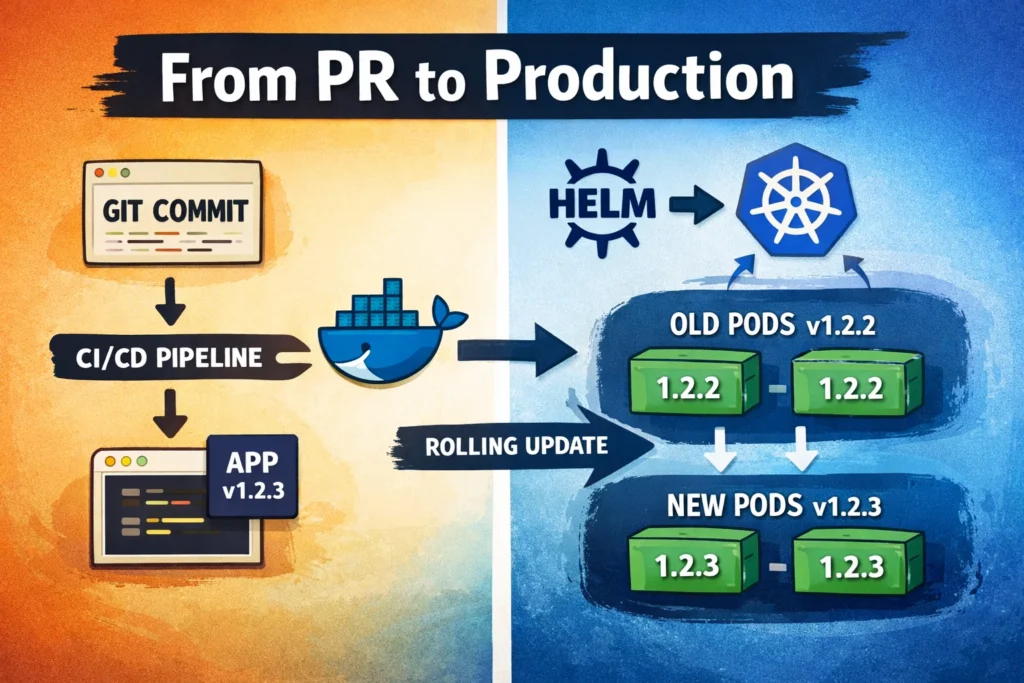
Thumbnail Idea
Visual split:
Left side:
Git commit → Docker image → CI
Right side:
Helm → Kubernetes → Rolling update animation
Overlay text:
“From PR to Production”
Image Suggestions
- Desired vs Current State diagram
- ReplicaSet A → ReplicaSet B visual
- Multi-service cluster layout
- Rolling update step-by-step flow
Final Perspective
Helm doesn’t deploy.
CI doesn’t deploy.
Developers don’t deploy.
Kubernetes maintains desired state.
Your job as an engineer is to:
- Make safe changes
- Use immutable images
- Understand rollout triggers
- Design health checks properly
- Respect production complexity
When you truly understand Deployments, ReplicaSets, and reconciliation loops — production stops being mysterious.
It becomes predictable.
More deep engineering breakdowns live on nileshblog.tech.
Ship carefully.